Human‑like AFK
automation
Intelligent input automation for grinding and idle progression. Randomised timing, burst behaviour, and movement simulation built to run for hours.
What is AFK Helper?
A lightweight input automation utility designed for repetitive gameplay loops that require continuous interaction over extended periods.
AFK Helper automates common player actions through configurable timing systems — allowing progression activities such as chest farming, rolling, or combat interaction to continue without constant manual input. Instead of rigid loops, it introduces controlled randomness: variable timing, optional pauses, burst behaviour, and subtle movement actions that better resemble natural player interaction patterns.
All functionality operates strictly at the operating system input layer. The application does not read game memory, analyse screen content, inject code, modify game files, or communicate with internal game systems. Every action performed is equivalent to a normal keyboard press or mouse action generated by a player — transparent and lightweight.
Three core design principles guide the project: Session Stability — reliable performance during long unattended sessions. Human‑Like Behaviour — timing variation and optional randomness reduce mechanical patterns. Efficiency & Simplicity — minimal resource usage with straightforward configuration.
Everything included
Every feature is individually toggleable. Enable only what you need.
Auto Swing / Auto Fire
Continuously performs the primary interaction action used for harvesting, attacking, or firing. Click timing is randomised between configurable minimum and maximum speeds to avoid rigid repetition. Designed for chest farming, combat grinding, and any gameplay loop requiring sustained input without manual clicking.
Burst Click Modelling
Introduces human-like bursts of rapid clicks followed by natural pacing. Burst activation occurs randomly based on a configurable Burst Chance. Variable burst length with automatic return to normal rhythm prevents perfectly uniform clicking patterns.
Configurable Pause System
Inserts occasional micro-breaks into active clicking loops to simulate natural hesitation or attention shifts. Configure Pause Frequency (chance of pause, 1 in X clicks) and Pause Duration (milliseconds). Operates independently from Burst logic and can be toggled on or off.
Auto Crouch / Stand
Periodically toggles crouch and standing states using randomised timing. Movement duration and intervals vary automatically to simulate natural player repositioning while AFK. Helps maintain activity detection without interrupting farming loops.
Random Jump System
Executes jumps at randomised intervals to maintain character activity. Jump timing and hold duration vary slightly to prevent predictable patterns.
Movement Cooldown Protection
Prevents crouch and jump actions from occurring too close together. A shared cooldown timer ensures movements remain spaced naturally and avoids rapid stacked inputs.
Boost Ability Automation
Automatically activates the Boost ability at a configurable minute-based interval. Ensures buffs and progression boosts maintain consistent uptime without manual tracking.
Upgrader Automation
Automatically presses the F4 key at user-defined intervals to trigger in-game upgrades without manual input. Features customisable delay between presses, automatic activation only when AFK mode is running, easy toggling with F7, and self-disabling when AFK stops.
- Enable AFK mode using F9 or the Start button.
- Toggle the Upgrader on/off using F7 or the GUI checkbox.
- Set your preferred F4 delay in seconds in the GUI.
- The script presses F4 at the set interval, stopping immediately when AFK is disabled.
Fully Adjustable Timing Ranges
All major actions operate within configurable minimum and maximum values. Randomisation occurs automatically within these ranges to maintain organic timing.
- Crouch Interval (Min / Max)
- Jump Interval (Min / Max)
- Click Speed (Min / Max)
- Burst Chance
- Pause Frequency & Duration
- Movement Cooldown
Countdown Alarm System
Built-in session timer for tracking AFK duration. Accepts flexible time formats: 5m, 30s, 1h30m. When the timer expires, an audible alarm repeatedly plays until stopped using F10. Custom alarm sounds are supported.
Automatic Settings Persistence
All configuration changes are saved automatically. Settings reload on launch so preferred behaviour is restored every session with zero reconfiguration.
Automatic Update Notification
Checks for newer versions on startup and notifies users when updates are available, providing quick access to downloads. No automatic installations — always your choice.
Global controls
Control everything without touching the GUI. All hotkeys work while the game is in focus.
Two modes, instant switching
Press F8 to toggle between modes at any time, even while running. Settings apply automatically — no restart needed.
Full AFK Farming
Designed for collecting chests automatically while AFK. All default actions are enabled: Crouch, Jump, Swing, AFK Helper, Pause, and Burst. Best used when AFK farming treasure chests with no aggressive combat required.
- ✓All actions enabled — Crouch, Jump, Swing, Boost, Pause, Burst
- ✓Crouch and Jump randomised from their interval settings
- ✓RapidClick with natural bursts and pauses
- ✓Boost activates at the configured interval
Focused Combat
Intended for rolling chests or attacking monsters (requires infinite ammo perk for monsters). Only Swing / Fire is enabled — all other actions are disabled for consistent attack speed.
- ✓Auto Swing / Fire active at consistent click speed
- ✗Crouch, Jump, Boost, Pause, Burst all disabled
- ✓Optimised for timing consistency over human simulation
Interface Preview
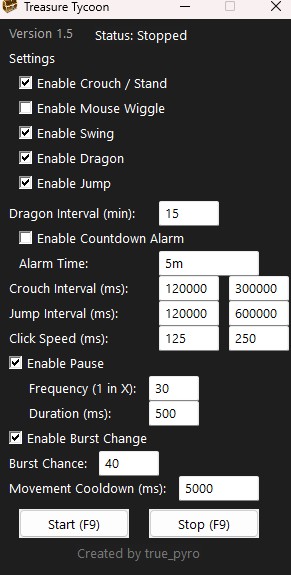
Screenshot of the AFK Helper main interface with default configuration enabled.
Safety & anti‑detection design
Every system is designed to avoid mechanical patterns. No rigid loops — behaviour evolves continuously over time.
Dynamic Timing Randomisation
All automated actions operate within configurable ranges rather than fixed delays. Each execution cycle produces slightly different timing values, preventing perfectly repeating input sequences that typically characterise basic automation scripts.
Behavioural Burst Modelling
Click activity periodically shifts into short bursts followed by normal pacing. This mirrors natural player behaviour where attention and interaction intensity fluctuate instead of remaining mechanically constant.
Configurable Pause Injection
Optional micro-pauses introduce irregular rest periods into active loops. These pauses simulate real player hesitation, repositioning, or momentary distraction, helping avoid uninterrupted robotic input streams.
Movement Variability Simulation
Randomised crouch, jump, and cursor micro-movement actions emulate subtle human repositioning during long sessions. A shared movement cooldown prevents unrealistic stacking of actions and maintains believable spacing.
Input-Only Architecture
AFK Helper operates exclusively through standard keyboard and mouse input simulation. It does not read game memory, inject code or DLLs, modify game files, hook internal functions, or intercept network traffic. This strict separation keeps the tool fully external to the game client.
Local Execution & Privacy
All logic runs locally on the user's machine. No gameplay data, personal information, or usage statistics are transmitted. The only optional network interaction is a version check to notify users about available updates.
Update check & notifications
A lightweight notification system keeps you informed about new releases without interrupting normal use.
How it works
- A quick version check runs when the application starts.
- If a newer version exists, a notification window appears.
- No automatic downloads or installations occur — you remain fully in control.
- You may dismiss the notification and continue using your current version.
Privacy & safety
- No personal information is collected during update checks.
- No background services or continuous monitoring are used.
- The check only verifies whether a newer version number exists.
How to download and use AFK Helper
Up and running in a few minutes.
Adjusting AFK Helper
All changes take effect immediately. Settings are saved automatically on close and restored on next launch.
Checkboxes
- Enable Crouch / Stand — Toggles automatic crouch/stand actions.
- Enable Swing / Fire — Controls automatic clicks for harvesting or attacking.
- Enable Boost — Activates Boost mode at the configured interval.
- Enable Jump — Makes your character jump randomly.
- Enable Pause — Adds occasional human-like delays between clicks.
- Enable Burst Chance — Enables bursts of rapid clicks at random intervals.
- Enable Countdown Alarm — Plays a sound after the set alarm time.
| Setting | Description | Example |
|---|---|---|
| Boost Interval | Minutes between Boost activations | 15 min |
| Crouch Interval Min/Max | Random range for crouch timing in ms | 120,000 – 300,000 ms (2–5 min) |
| Jump Interval Min/Max | Random range for jump timing in ms | 120,000 – 600,000 ms (2–10 min) |
| Click Speed Min/Max | Interval between normal clicks in ms | 125 – 250 ms |
| Pause Frequency | Chance of a pause — 1 in X clicks | 30 = roughly 1 in 30 |
| Pause Duration | Length of each pause in ms | 500 ms |
| Burst Chance | 1 in X chance to start a burst of 6–15 clicks | 40 = 1 in 40 |
| Movement Cooldown | Minimum time between movement actions in ms | 5,000 ms (5 s) |
| F4 Upgrade Delay | Seconds between each F4 press | 10 s |
| Alarm Time | Countdown before alarm sounds | 5m · 30s · 1h30m |
Tips & examples
- Enable Crouch, Pause, and Burst together for more human-like harvesting behaviour.
- Disable Pause and Burst in Roll/Fire mode for consistent rapid attacks.
- Set Click Speed Min/Max to 100–200 ms for faster clicks, or higher for slower behaviour.
- Set Boost Interval to 20 minutes to activate Boost less frequently.
- Set Alarm Time to
10mto receive a reminder after 10 minutes of AFK.
Executable & antivirus information
The .exe is compiled from an AutoHotkey (.ahk) script using the official AutoHotkey compiler. Source code is included in every download.
Why antivirus may show warnings
AutoHotkey is a widely used automation framework. Because the same input simulation technology can be misused, many antivirus programs use heuristic detection that flags automation executables automatically — even when they are completely safe. These alerts are classified as false positives or Potentially Unwanted Programs (PUPs).
What AFK Helper does — and does not do
- ✓Simulates keyboard and mouse input only
- ✓Runs entirely on your local computer
- ✓No background services or hidden processes
- ✓No administrator installation required
- ✗Does NOT read or modify game memory
- ✗Does NOT inject code or DLLs
- ✗Does NOT access network traffic or external servers
- ✗Does NOT collect personal data or telemetry
Security recommendations
- Download only from the official project source.
- Avoid re-uploaded or modified builds from third-party sites.
- Review the included .ahk source script before running if you want full verification.
- Scan the file with your preferred antivirus before running.
Download AFK Helper
Free. No install required. Source code included for full transparency. Windows only.
↓ DownloadFrequently asked questions
Everything you need to know before and after downloading.
Get in touch
Questions, bug reports, or feature ideas — reach out on Discord.
Message true_pyro_028 — bugs, ideas, and questions are welcome. Please be respectful and avoid spamming.